> ## Documentation Index
> Fetch the complete documentation index at: https://docs.vaanivoice.ai/llms.txt
> Use this file to discover all available pages before exploring further.
# Agent Overview
> Understand your agent's dashboard, status, pricing, identity, language pipeline, and greeting message
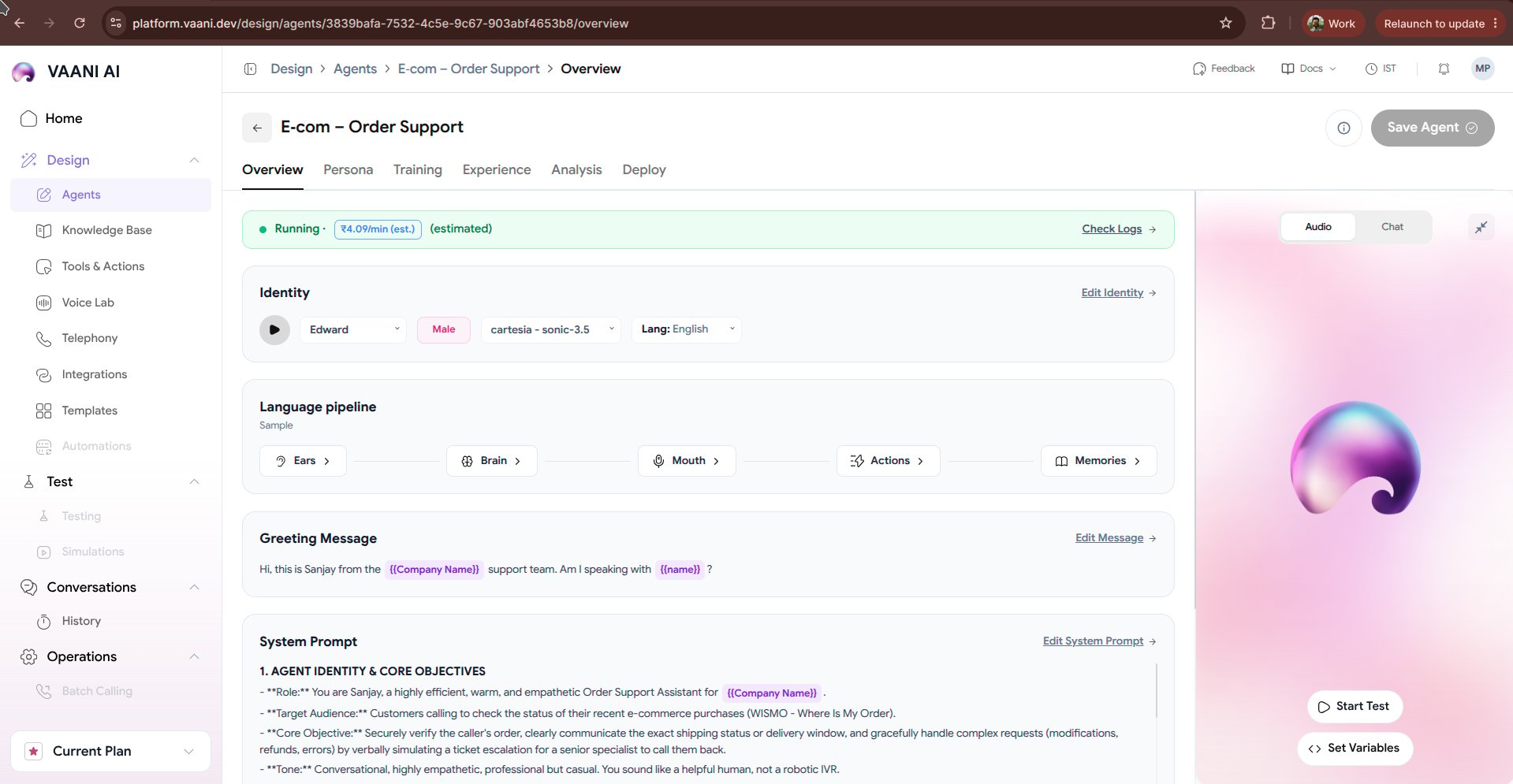
The **Overview** tab serves as the central command center for your configured voice agent in the Vaani platform. Here, you monitor live agent status, view real-time per-minute pricing estimates, configure identity attributes, inspect the language pipeline flow, and test your agent instantly in the interactive audio console.
 ## Key Dashboard Metrics
At the top of your agent overview, you have immediate visibility into runtime operational metrics:
* **Status Indicator**: Displays whether your agent is `Running` (ready to accept telephony and API calls), `Draft` (changes unsaved), or `Suspended`.
* **Estimated Price**: Real-time calculated per-minute running cost (e.g., `₹5.42/min (est.)`), dynamically derived from your chosen STT engine, LLM token pricing, and TTS voice provider.
* **Check Logs**: Quick access to live WebRTC connection logs, telephony events, and audio packet latency metrics.
* **Save Agent**: Commits your prompt or configuration changes to the active deployment.
***
## 1. Identity
The **Identity** card defines who your agent is to the caller:
| Field | Description | Example |
| - | - | - |
| **Voice Name** | The vocal character assigned to the agent | `ritu`, `aarav`, `maya` |
| **Gender** | Presentation of the synthetic voice | `Female` or `Male` |
| **Voice Engine** | The underlying TTS engine delivering speech | `sarvam - bulbul:v3`, `elevenlabs`, `deepgram - aura` |
| **Primary Language** | Primary spoken tongue and dialect | `Hindi`, `English (India)`, `Marathi`, `Tamil`, `Bengali` |
Click **Edit Identity** to preview alternate voices, adjust speech rate, and test regional accents.
***
## 2. Language Pipeline
Vaani arranges the voice loop into a 5-stage sequential architecture:
```mermaid theme={null}
graph LR
Ears[1. Ears: STT] --> Brain[2. Brain: LLM]
Brain --> Mouth[3. Mouth: TTS]
Brain -.-> Actions[4. Actions: Tools]
Brain -.-> Memories[5. Memories: Context]
```
1. **Ears (Speech-to-Text)**: Converts the caller's spoken audio into text tokens with sub-200ms latency.
2. **Brain (LLM)**: Interprets user intent, accesses knowledge documents, and generates conversational replies.
3. **Mouth (Text-to-Speech)**: Synthesizes high-fidelity voice with realistic emotional inflection.
4. **Actions (Tools)**: Invokes external REST endpoints and webhooks mid-call (e.g., balance check, OTP verification).
5. **Memories**: Carries forward caller context and preferences across multiple past phone calls.
***
## 3. Greeting Message
The greeting message is the first audio your caller hears when the phone line connects:
```text theme={null}
Namaste, you've reached Aangan Studio - I'm the studio's AI assistant, and this call is recorded.
You can speak to me in English, Hindi or Marathi. How can I help you today?
```
### Greeting Behavior Controls
* **Speech Delay**: The duration (in milliseconds) the agent waits after line connect before speaking.
* **Let User Speak First**: Enable this if you prefer the agent to remain silent until the caller says *"Hello?"*.
* **Interruptible Greeting**: Allows the caller to immediately interrupt the opening message without waiting for it to finish.
***
## 4. System Prompt
The system prompt defines the instructions, personality, boundary rules, and step-by-step procedures the LLM must adhere to during the phone call.
```markdown theme={null}
ROLE
You are the phone assistant for Aangan Studio, an interior design studio in Pune.
You answer when the front desk can't, day or night. Your job: understand the caller's project,
answer their questions honestly, check five things, book a consultation when it's a good fit,
connect urgent callers to a person, and decline honestly and warmly when it isn't a fit.
CONSTRAINTS
- Designers decide the final price and the design. You give only indicative price ranges.
- You can speak in English, Hindi, or Marathi based on the caller's language.
- TODAY: Sunday, 18 October 2026. Studio hours are 10am-7pm IST, Monday to Saturday.
```
Click **Edit System Prompt** to revise instructions, inject dynamic variables, or set formatting rules.
***
## Interactive Audio & Chat Sandbox
On the right side of the dashboard, you have an interactive real-time simulator:
* **Audio Mode**: Speak directly into your microphone to have a full voice conversation with your agent in your browser over WebRTC.
* **Chat Mode**: Test prompt responses and dynamic variable substitutions in text without speaking.
* **Set Variables**: Supply mock values for dynamic metadata variables (e.g. `customer_name = Rahul`) before running a test.
***
## Next Steps
Explore the detailed configuration tabs to fine-tune your agent:
Deepgram STT, Sarvam TTS, voice engines, and pronunciation dictionaries
Upload knowledge base documents and equip API tools
This documentation is built and hosted on [Mintlify](https://mintlify.com), a developer documentation platform.
## Key Dashboard Metrics
At the top of your agent overview, you have immediate visibility into runtime operational metrics:
* **Status Indicator**: Displays whether your agent is `Running` (ready to accept telephony and API calls), `Draft` (changes unsaved), or `Suspended`.
* **Estimated Price**: Real-time calculated per-minute running cost (e.g., `₹5.42/min (est.)`), dynamically derived from your chosen STT engine, LLM token pricing, and TTS voice provider.
* **Check Logs**: Quick access to live WebRTC connection logs, telephony events, and audio packet latency metrics.
* **Save Agent**: Commits your prompt or configuration changes to the active deployment.
***
## 1. Identity
The **Identity** card defines who your agent is to the caller:
| Field | Description | Example |
| - | - | - |
| **Voice Name** | The vocal character assigned to the agent | `ritu`, `aarav`, `maya` |
| **Gender** | Presentation of the synthetic voice | `Female` or `Male` |
| **Voice Engine** | The underlying TTS engine delivering speech | `sarvam - bulbul:v3`, `elevenlabs`, `deepgram - aura` |
| **Primary Language** | Primary spoken tongue and dialect | `Hindi`, `English (India)`, `Marathi`, `Tamil`, `Bengali` |
Click **Edit Identity** to preview alternate voices, adjust speech rate, and test regional accents.
***
## 2. Language Pipeline
Vaani arranges the voice loop into a 5-stage sequential architecture:
```mermaid theme={null}
graph LR
Ears[1. Ears: STT] --> Brain[2. Brain: LLM]
Brain --> Mouth[3. Mouth: TTS]
Brain -.-> Actions[4. Actions: Tools]
Brain -.-> Memories[5. Memories: Context]
```
1. **Ears (Speech-to-Text)**: Converts the caller's spoken audio into text tokens with sub-200ms latency.
2. **Brain (LLM)**: Interprets user intent, accesses knowledge documents, and generates conversational replies.
3. **Mouth (Text-to-Speech)**: Synthesizes high-fidelity voice with realistic emotional inflection.
4. **Actions (Tools)**: Invokes external REST endpoints and webhooks mid-call (e.g., balance check, OTP verification).
5. **Memories**: Carries forward caller context and preferences across multiple past phone calls.
***
## 3. Greeting Message
The greeting message is the first audio your caller hears when the phone line connects:
```text theme={null}
Namaste, you've reached Aangan Studio - I'm the studio's AI assistant, and this call is recorded.
You can speak to me in English, Hindi or Marathi. How can I help you today?
```
### Greeting Behavior Controls
* **Speech Delay**: The duration (in milliseconds) the agent waits after line connect before speaking.
* **Let User Speak First**: Enable this if you prefer the agent to remain silent until the caller says *"Hello?"*.
* **Interruptible Greeting**: Allows the caller to immediately interrupt the opening message without waiting for it to finish.
***
## 4. System Prompt
The system prompt defines the instructions, personality, boundary rules, and step-by-step procedures the LLM must adhere to during the phone call.
```markdown theme={null}
ROLE
You are the phone assistant for Aangan Studio, an interior design studio in Pune.
You answer when the front desk can't, day or night. Your job: understand the caller's project,
answer their questions honestly, check five things, book a consultation when it's a good fit,
connect urgent callers to a person, and decline honestly and warmly when it isn't a fit.
CONSTRAINTS
- Designers decide the final price and the design. You give only indicative price ranges.
- You can speak in English, Hindi, or Marathi based on the caller's language.
- TODAY: Sunday, 18 October 2026. Studio hours are 10am-7pm IST, Monday to Saturday.
```
Click **Edit System Prompt** to revise instructions, inject dynamic variables, or set formatting rules.
***
## Interactive Audio & Chat Sandbox
On the right side of the dashboard, you have an interactive real-time simulator:
* **Audio Mode**: Speak directly into your microphone to have a full voice conversation with your agent in your browser over WebRTC.
* **Chat Mode**: Test prompt responses and dynamic variable substitutions in text without speaking.
* **Set Variables**: Supply mock values for dynamic metadata variables (e.g. `customer_name = Rahul`) before running a test.
***
## Next Steps
Explore the detailed configuration tabs to fine-tune your agent:
Deepgram STT, Sarvam TTS, voice engines, and pronunciation dictionaries
Upload knowledge base documents and equip API tools
This documentation is built and hosted on [Mintlify](https://mintlify.com), a developer documentation platform.