> ## Documentation Index
> Fetch the complete documentation index at: https://docs.vaanivoice.ai/llms.txt
> Use this file to discover all available pages before exploring further.
# Vibe-Code Your Agent
> Tell Vaani what your agent should do in plain English and see magic happen with AI-assisted agent generation
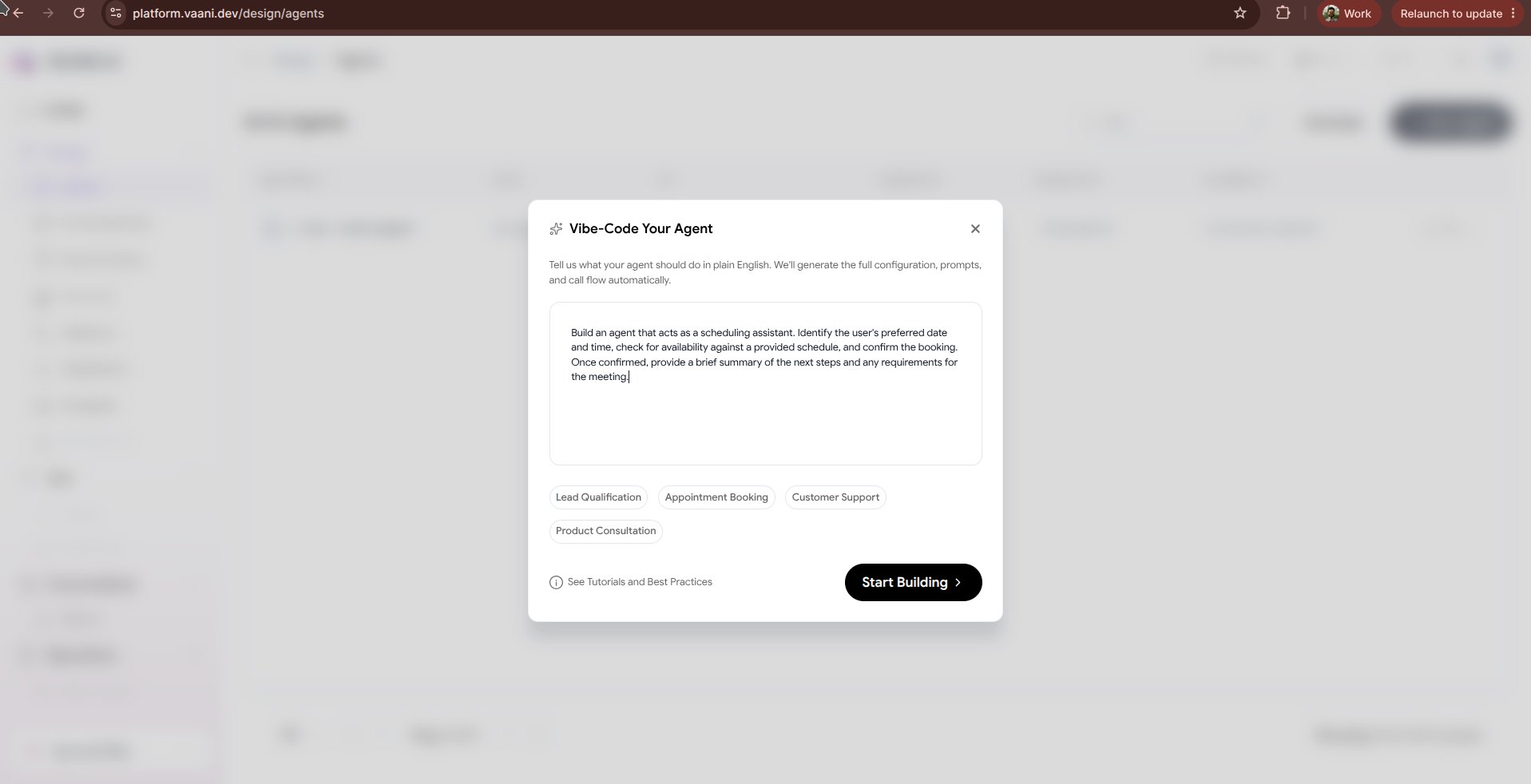
**Vibe-Coding** allows you to describe your desired voice agent in everyday conversational English, and let Vaani's generative AI engine architect the complete agent specification for you.
Instead of manually drafting system prompts, picking language pipeline providers, and specifying JSON schemas, you simply type your requirements and let Vaani synthesize the agent in seconds.
 ## Why Vibe-Code?
Describe a scenario and get a ready-to-call voice agent instantly without writing boilerplate rules.
Vaani applies speech-specific prompt engineering best practices (latency cues, interruption handling, conversational pauses).
Chat back and forth with the AI architect to refine tone, add constraints, or introduce external API tools.
***
## How to Vibe-Code Your Agent
Click **+ New Agent** in the dashboard and choose **Vibe-Code Your Agent**.
Enter a prompt detailing your business, target audience, and the tasks the voice agent should handle.
> **Example Prompt:**
> *"Create an inbound customer support agent for 'Zippy Logistics'. The agent should speak in English and Hindi, answer delivery status questions, ask for the 8-digit tracking number, apologize warmly if a package is delayed, and offer to create an escalation ticket with our team."*
Vaani's engine immediately generates:
* **System Prompt**: A production-ready markdown prompt with role definitions, boundary constraints, and fallback dialog.
* **Greeting Message**: A conversational, welcoming opening script.
* **Language Pipeline**: Auto-selected STT (Deepgram Nova-2), Brain (LLM), and TTS voice (e.g., Sarvam Ritu for Hindi/English).
* **Dynamic Metadata Variables**: Placeholders such as `{tracking_number}` and `{customer_name}`.
Use the prompt chat interface to iterate on the fly:
* *"Make the greeting sound more energetic and welcoming."*
* *"Add a rule to never disclose internal warehouse hub addresses."*
* *"Switch the voice to a calm, professional male tone."*
Click the in-browser **Test Audio** button to have a test conversation with your synthesized agent. Once satisfied, click **Save Agent** to get your `agent_id`.
***
## Tips for Great Vibe-Coding Prompts
To get the most accurate and high-performing agent from the generator, include these four elements in your description:
| Element | What to Include | Example |
| - | - | - |
| **Role & Persona** | Business name, agent persona, and vocal personality | *"Friendly front-desk assistant for Apex Dental Clinic"* |
| **Languages** | Primary languages and dialect requirements | *"Multilingual in English and Hinglish (Hindi + English)"* |
| **Objectives** | Concrete actions the agent should achieve on the call | *"Qualify patient urgency, collect phone number, and book appointment"* |
| **Guardrails** | What the agent must NOT do | *"Never provide medical diagnosis or commit to prices above ₹2,000 without doctor review"* |
***
## Next Steps
Fine-tune interruption sensitivity, ambient sound, and conversational delays
Upload FAQ documents and product manuals for your vibe-coded agent to reference
This documentation is built and hosted on [Mintlify](https://mintlify.com), a developer documentation platform.
## Why Vibe-Code?
Describe a scenario and get a ready-to-call voice agent instantly without writing boilerplate rules.
Vaani applies speech-specific prompt engineering best practices (latency cues, interruption handling, conversational pauses).
Chat back and forth with the AI architect to refine tone, add constraints, or introduce external API tools.
***
## How to Vibe-Code Your Agent
Click **+ New Agent** in the dashboard and choose **Vibe-Code Your Agent**.
Enter a prompt detailing your business, target audience, and the tasks the voice agent should handle.
> **Example Prompt:**
> *"Create an inbound customer support agent for 'Zippy Logistics'. The agent should speak in English and Hindi, answer delivery status questions, ask for the 8-digit tracking number, apologize warmly if a package is delayed, and offer to create an escalation ticket with our team."*
Vaani's engine immediately generates:
* **System Prompt**: A production-ready markdown prompt with role definitions, boundary constraints, and fallback dialog.
* **Greeting Message**: A conversational, welcoming opening script.
* **Language Pipeline**: Auto-selected STT (Deepgram Nova-2), Brain (LLM), and TTS voice (e.g., Sarvam Ritu for Hindi/English).
* **Dynamic Metadata Variables**: Placeholders such as `{tracking_number}` and `{customer_name}`.
Use the prompt chat interface to iterate on the fly:
* *"Make the greeting sound more energetic and welcoming."*
* *"Add a rule to never disclose internal warehouse hub addresses."*
* *"Switch the voice to a calm, professional male tone."*
Click the in-browser **Test Audio** button to have a test conversation with your synthesized agent. Once satisfied, click **Save Agent** to get your `agent_id`.
***
## Tips for Great Vibe-Coding Prompts
To get the most accurate and high-performing agent from the generator, include these four elements in your description:
| Element | What to Include | Example |
| - | - | - |
| **Role & Persona** | Business name, agent persona, and vocal personality | *"Friendly front-desk assistant for Apex Dental Clinic"* |
| **Languages** | Primary languages and dialect requirements | *"Multilingual in English and Hinglish (Hindi + English)"* |
| **Objectives** | Concrete actions the agent should achieve on the call | *"Qualify patient urgency, collect phone number, and book appointment"* |
| **Guardrails** | What the agent must NOT do | *"Never provide medical diagnosis or commit to prices above ₹2,000 without doctor review"* |
***
## Next Steps
Fine-tune interruption sensitivity, ambient sound, and conversational delays
Upload FAQ documents and product manuals for your vibe-coded agent to reference
This documentation is built and hosted on [Mintlify](https://mintlify.com), a developer documentation platform.