> ## Documentation Index
> Fetch the complete documentation index at: https://docs.vaanivoice.ai/llms.txt
> Use this file to discover all available pages before exploring further.
# Webhook Setup
> Receive real-time call events from Vaani
## What is a Webhook?
A webhook lets Vaani push call events to your server in real time — no polling required.
You'll receive an HTTP **POST** request to your endpoint whenever a call lifecycle event occurs (e.g. call started, ended, transferred, or post-processed).
## Event Types
Vaani fires webhooks for both **outbound** and **inbound** calls.
| Event | Outbound | Inbound | Description |
| --------------------------- | -------- | ------- | -------------------------------------------------------------------------- |
| `call_started` | Yes | Yes | Call initiated / inbound participant connected |
| `call_ringing` | Yes | No | Phone is actively ringing |
| `user_picked_up_at` | Yes | Yes | User answered the call |
| `call_rejected` | Yes | No | User rejected or line was busy |
| `call_no_answer` | Yes | No | No answer after \~45 s timeout |
| `call_failed` | Yes | No | SIP error or abrupt abort |
| `human_transfer_initiated` | Yes | Yes | Call transfer to human agent triggered |
| `human_transfer_successful` | Yes | Yes | Warm transfer connected to specialist |
| `human_transfer_failed` | Yes | Yes | Warm transfer failed (rejected / busy / no-answer) |
| `call_ended` | Yes | Yes | Session terminated — `call_duration` in **seconds** |
| `call_postprocessing` | Yes | Yes | Summary, transcript & entities ready — `call_duration` in **milliseconds** |
***
## Setup
Set up an HTTP endpoint on your server that accepts POST requests and returns `200 OK`.
```python theme={null}
from flask import Flask, request
app = Flask(__name__)
@app.route("/vaani/webhook", methods=["POST"])
def handle_webhook():
payload = request.json
event = payload.get("event")
if event == "call_ended":
print(f"Call {payload['room_name']} ended after {payload['call_duration']}s")
elif event == "call_postprocessing":
print(f"Transcript: {payload['transcript']}")
print(f"Summary: {payload['summary']}")
elif event == "human_transfer_initiated":
print(f"Transferring to {payload['phone_number']}")
return {"status": "ok"}, 200
```
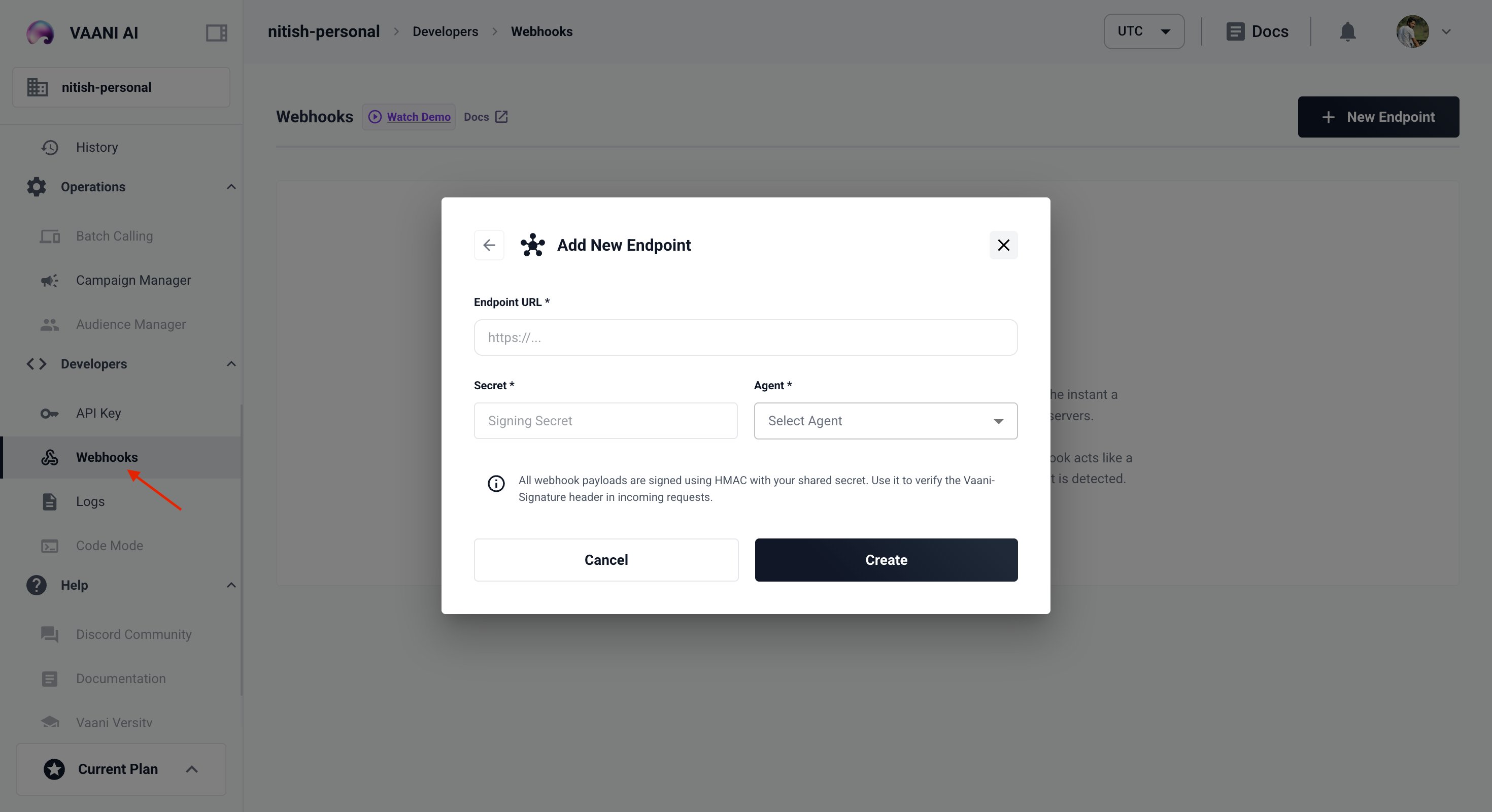
Go to **Settings → Webhooks** and add your endpoint URL.
 Your webhook endpoint must be publicly accessible. For local development, use a tunnel like [ngrok](https://ngrok.com).
***
## Payload Reference
### Outbound Call Events
#### `call_started`
Fired as soon as the SIP participant joins the room and the call begins dialing.
```json theme={null}
{
"event": "call_started",
"room_name": "room_123abc",
"status": "dialing",
"phone_number": "+1234567890"
}
```
#### `call_ringing`
Fired when the carrier reports the phone is actively ringing at the destination.
```json theme={null}
{
"event": "call_ringing",
"room_name": "room_123abc",
"status": "ringing"
}
```
### Lifecycle Success Events
#### `user_picked_up_at`
Fired when the user answers and media starts flowing.
```json theme={null}
{
"event": "user_picked_up_at",
"room_name": "room_123abc",
"status": "active"
}
```
### Lifecycle Terminal Errors (Outbound Only)
#### `call_rejected`
Fired if the user manually rejects the call (SIP 486 or 603 Busy).
```json theme={null}
{
"event": "call_rejected",
"room_name": "room_123abc",
"status": "rejected"
}
```
#### `call_no_answer`
Fired if the call rings until carrier timeout (typically 45–60 s) without answer.
```json theme={null}
{
"event": "call_no_answer",
"room_name": "room_123abc",
"status": "no_answer"
}
```
#### `call_failed`
Fired for abrupt SIP errors, technical failures, or invalid destination numbers.
```json theme={null}
{
"event": "call_failed",
"room_name": "room_123abc",
"status": "failed",
"error": "SIP_404_NOT_FOUND"
}
```
### Human Agent Transfer Events
#### `human_transfer_initiated`
Fired when the AI agent triggers the `transfer_call` tool to hand off the session.
```json theme={null}
{
"event": "human_transfer_initiated",
"room_name": "room_123abc",
"transfer_type": "warm",
"phone_number": "+919876543210"
}
```
#### `human_transfer_successful`
Fired when the human specialist answers and the AI agent is ready to introduce the call.
```json theme={null}
{
"event": "human_transfer_successful",
"room_name": "room_123abc",
"transfer_type": "warm",
"phone_number": "+919876543210",
"agent_identity": "human_agent_1712485300"
}
```
#### `human_transfer_failed`
Fired if the transfer cannot be completed due to rejection, busy signal, or no-answer.
```json theme={null}
{
"event": "human_transfer_failed",
"room_name": "room_123abc",
"transfer_type": "warm",
"phone_number": "+919876543210",
"reason": "busy",
"sip_status": "busy"
}
```
### Session Termination & Analysis
#### `call_ended`
Fired as soon as the room is disconnected and the session terminates.
`call_duration` in this event is expressed in **seconds**.
```json theme={null}
{
"event": "call_ended",
"room_name": "room_123abc",
"call_duration": 42.5,
"end_reason": "AGENT_REQUESTED_DISCONNECT"
}
```
#### `call_postprocessing`
Fired after the session ends and the backend has completed transcription, summary generation, and entity extraction.
`call_duration` in this event is expressed in **milliseconds**.
```json theme={null}
{
"event": "call_postprocessing",
"room_name": "room_123abc",
"call_duration": 42500,
"transcript": "User: Hello. Agent: Hi, how can I help you? ...",
"summary": "Customer called to inquire about service availability in Mumbai.",
"entities": {
"location": "Mumbai",
"intent": "service_inquiry"
},
"recording_url": "https://storage.vaani.ai/recordings/call_123.mp3"
}
```
Your webhook endpoint must be publicly accessible. For local development, use a tunnel like [ngrok](https://ngrok.com).
***
## Payload Reference
### Outbound Call Events
#### `call_started`
Fired as soon as the SIP participant joins the room and the call begins dialing.
```json theme={null}
{
"event": "call_started",
"room_name": "room_123abc",
"status": "dialing",
"phone_number": "+1234567890"
}
```
#### `call_ringing`
Fired when the carrier reports the phone is actively ringing at the destination.
```json theme={null}
{
"event": "call_ringing",
"room_name": "room_123abc",
"status": "ringing"
}
```
### Lifecycle Success Events
#### `user_picked_up_at`
Fired when the user answers and media starts flowing.
```json theme={null}
{
"event": "user_picked_up_at",
"room_name": "room_123abc",
"status": "active"
}
```
### Lifecycle Terminal Errors (Outbound Only)
#### `call_rejected`
Fired if the user manually rejects the call (SIP 486 or 603 Busy).
```json theme={null}
{
"event": "call_rejected",
"room_name": "room_123abc",
"status": "rejected"
}
```
#### `call_no_answer`
Fired if the call rings until carrier timeout (typically 45–60 s) without answer.
```json theme={null}
{
"event": "call_no_answer",
"room_name": "room_123abc",
"status": "no_answer"
}
```
#### `call_failed`
Fired for abrupt SIP errors, technical failures, or invalid destination numbers.
```json theme={null}
{
"event": "call_failed",
"room_name": "room_123abc",
"status": "failed",
"error": "SIP_404_NOT_FOUND"
}
```
### Human Agent Transfer Events
#### `human_transfer_initiated`
Fired when the AI agent triggers the `transfer_call` tool to hand off the session.
```json theme={null}
{
"event": "human_transfer_initiated",
"room_name": "room_123abc",
"transfer_type": "warm",
"phone_number": "+919876543210"
}
```
#### `human_transfer_successful`
Fired when the human specialist answers and the AI agent is ready to introduce the call.
```json theme={null}
{
"event": "human_transfer_successful",
"room_name": "room_123abc",
"transfer_type": "warm",
"phone_number": "+919876543210",
"agent_identity": "human_agent_1712485300"
}
```
#### `human_transfer_failed`
Fired if the transfer cannot be completed due to rejection, busy signal, or no-answer.
```json theme={null}
{
"event": "human_transfer_failed",
"room_name": "room_123abc",
"transfer_type": "warm",
"phone_number": "+919876543210",
"reason": "busy",
"sip_status": "busy"
}
```
### Session Termination & Analysis
#### `call_ended`
Fired as soon as the room is disconnected and the session terminates.
`call_duration` in this event is expressed in **seconds**.
```json theme={null}
{
"event": "call_ended",
"room_name": "room_123abc",
"call_duration": 42.5,
"end_reason": "AGENT_REQUESTED_DISCONNECT"
}
```
#### `call_postprocessing`
Fired after the session ends and the backend has completed transcription, summary generation, and entity extraction.
`call_duration` in this event is expressed in **milliseconds**.
```json theme={null}
{
"event": "call_postprocessing",
"room_name": "room_123abc",
"call_duration": 42500,
"transcript": "User: Hello. Agent: Hi, how can I help you? ...",
"summary": "Customer called to inquire about service availability in Mumbai.",
"entities": {
"location": "Mumbai",
"intent": "service_inquiry"
},
"recording_url": "https://storage.vaani.ai/recordings/call_123.mp3"
}
```