

What is a Webhook?
A webhook lets Vaani push call events to your server in real time — no polling required.
You’ll receive an HTTP POST request to your endpoint whenever a call lifecycle event occurs (e.g. call started, ended, transferred, or post-processed).
Event Types
Vaani fires webhooks for both outbound and inbound calls.
| Event | Outbound | Inbound | Description |
|---|
call_started | Yes | Yes | Call initiated / inbound participant connected |
call_ringing | Yes | No | Phone is actively ringing |
user_picked_up_at | Yes | Yes | User answered the call |
call_rejected | Yes | No | User rejected or line was busy |
call_no_answer | Yes | No | No answer after ~45 s timeout |
call_failed | Yes | No | SIP error or abrupt abort |
human_transfer_initiated | Yes | Yes | Call transfer to human agent triggered |
human_transfer_successful | Yes | Yes | Warm transfer connected to specialist |
human_transfer_failed | Yes | Yes | Warm transfer failed (rejected / busy / no-answer) |
call_ended | Yes | Yes | Session terminated — call_duration in seconds |
call_postprocessing | Yes | Yes | Summary, transcript & entities ready — call_duration in milliseconds |
Setup
Create a Webhook Endpoint
Set up an HTTP endpoint on your server that accepts POST requests and returns 200 OK.from flask import Flask, request
app = Flask(__name__)
@app.route("/vaani/webhook", methods=["POST"])
def handle_webhook():
payload = request.json
event = payload.get("event")
if event == "call_ended":
print(f"Call {payload['room_name']} ended after {payload['call_duration']}s")
elif event == "call_postprocessing":
print(f"Transcript: {payload['transcript']}")
print(f"Summary: {payload['summary']}")
elif event == "human_transfer_initiated":
print(f"Transferring to {payload['phone_number']}")
return {"status": "ok"}, 200
Register the Webhook in the Dashboard
Go to Settings → Webhooks and add your endpoint URL.
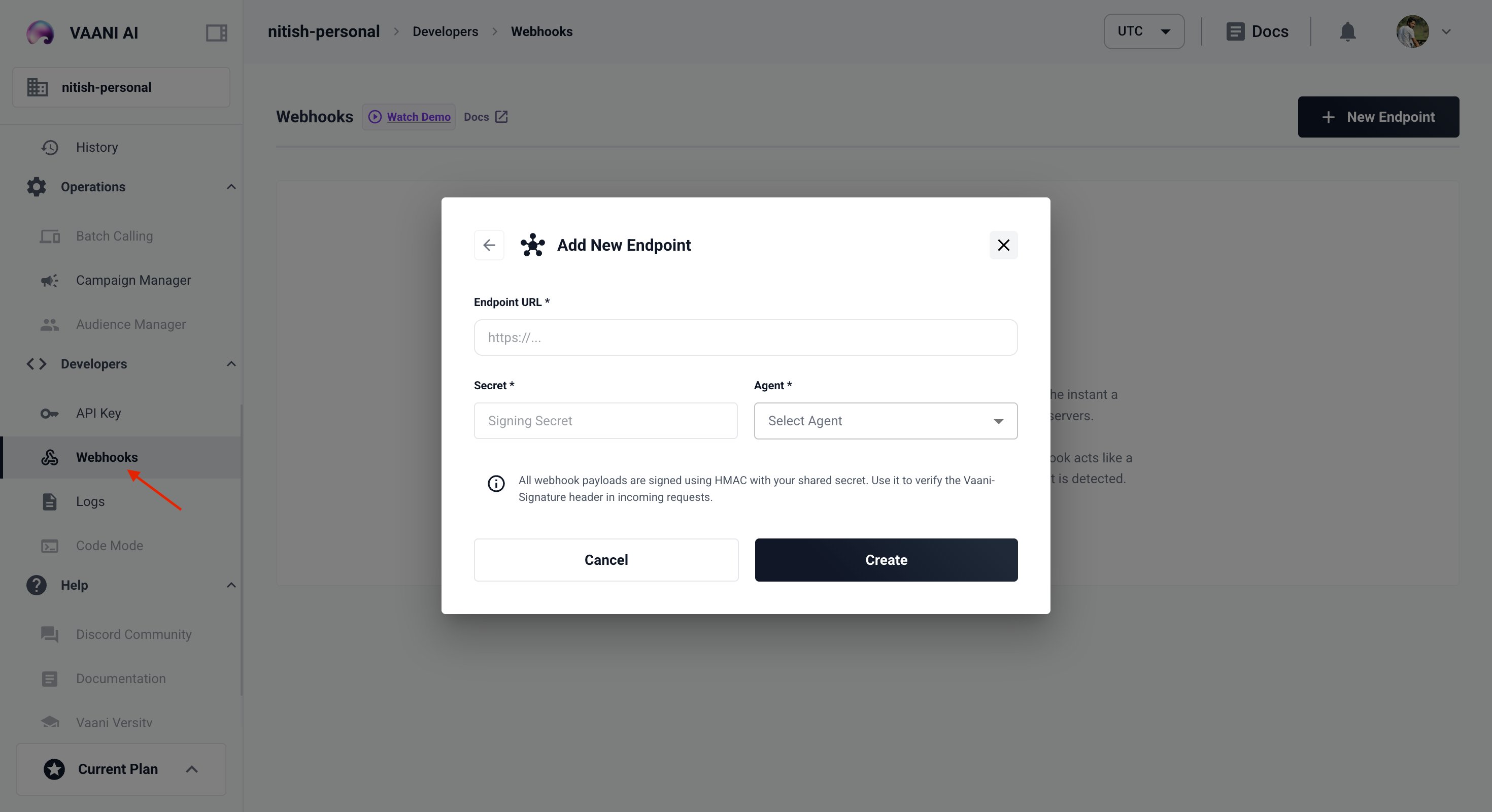
Your webhook endpoint must be publicly accessible. For local development, use a tunnel like ngrok.
Payload Reference
Outbound Call Events
call_started
Fired as soon as the SIP participant joins the room and the call begins dialing.
{
"event": "call_started",
"room_name": "room_123abc",
"status": "dialing",
"phone_number": "+1234567890"
}
call_ringing
Fired when the carrier reports the phone is actively ringing at the destination.
{
"event": "call_ringing",
"room_name": "room_123abc",
"status": "ringing"
}
Lifecycle Success Events
user_picked_up_at
Fired when the user answers and media starts flowing.
{
"event": "user_picked_up_at",
"room_name": "room_123abc",
"status": "active"
}
Lifecycle Terminal Errors (Outbound Only)
call_rejected
Fired if the user manually rejects the call (SIP 486 or 603 Busy).
{
"event": "call_rejected",
"room_name": "room_123abc",
"status": "rejected"
}
call_no_answer
Fired if the call rings until carrier timeout (typically 45–60 s) without answer.
{
"event": "call_no_answer",
"room_name": "room_123abc",
"status": "no_answer"
}
call_failed
Fired for abrupt SIP errors, technical failures, or invalid destination numbers.
{
"event": "call_failed",
"room_name": "room_123abc",
"status": "failed",
"error": "SIP_404_NOT_FOUND"
}
Human Agent Transfer Events
human_transfer_initiated
Fired when the AI agent triggers the transfer_call tool to hand off the session.
{
"event": "human_transfer_initiated",
"room_name": "room_123abc",
"transfer_type": "warm",
"phone_number": "+919876543210"
}
human_transfer_successful
Fired when the human specialist answers and the AI agent is ready to introduce the call.
{
"event": "human_transfer_successful",
"room_name": "room_123abc",
"transfer_type": "warm",
"phone_number": "+919876543210",
"agent_identity": "human_agent_1712485300"
}
human_transfer_failed
Fired if the transfer cannot be completed due to rejection, busy signal, or no-answer.
{
"event": "human_transfer_failed",
"room_name": "room_123abc",
"transfer_type": "warm",
"phone_number": "+919876543210",
"reason": "busy",
"sip_status": "busy"
}
Session Termination & Analysis
call_ended
Fired as soon as the room is disconnected and the session terminates.
call_duration in this event is expressed in seconds.
{
"event": "call_ended",
"room_name": "room_123abc",
"call_duration": 42.5,
"end_reason": "AGENT_REQUESTED_DISCONNECT"
}
call_postprocessing
Fired after the session ends and the backend has completed transcription, summary generation, and entity extraction.
call_duration in this event is expressed in milliseconds.
{
"event": "call_postprocessing",
"room_name": "room_123abc",
"call_duration": 42500,
"transcript": "User: Hello. Agent: Hi, how can I help you? ...",
"summary": "Customer called to inquire about service availability in Mumbai.",
"entities": {
"location": "Mumbai",
"intent": "service_inquiry"
},
"recording_url": "https://storage.vaani.ai/recordings/call_123.mp3"
}